
The plugin system
This is a guide, not the contract. What the platform guarantees is specified under
openspec/specs/. For this page:plugin-runtime·plugin-permissions·plugin-sandbox·plugin-store. Where this page and a specification disagree, the specification is right, and that is a defect in this page: change the behaviour there, then explain it here.
LoomWeaver is a plugin platform with no domain logic of its own. That means “how plugins are loaded, trusted and controlled” is the platform. This page describes it from the distribution’s point of view. It covers three things: the four ways a plugin can reach a running app and the three rungs of trust they map to, what the capability broker does in each case, and what the user can turn off.
For the plugin author’s view, what ctx offers and how to build a weaver, see
authoring a weaver.
Four ways in, one contract
Every plugin implements the same Plugin interface and receives the same ctx. What differs is
isolation, how it arrives, and whose decision it was. Four ways, three rungs of trust: trusted
and frame plugins are the first two rungs; operator-deployed and community-installed plugins are both
the third, installed at runtime, and differ only in whose decision it was:
| Trusted | Frame plugin | Operator-deployed | Community-installed | |
|---|---|---|---|---|
| Arrives via | providePlugins() | provideFramePlugins() | a catalogue entry marked deployed | the user, from a catalogue |
| Runs in | the app itself | an <iframe>, at the level the composition chooses | an <iframe>, at the level the catalogue allows | <iframe sandbox="allow-scripts"> |
ctx is | a direct object | a Penpal RPC proxy | a Penpal RPC proxy | a Penpal RPC proxy |
| Written in | Angular | anything | anything | anything |
| Grant comes from | your composition root | your composition root | the entry itself | the install dialog |
| Decided at | build time | build time | run time, by the operator | run time, by the user |
| The user may turn it off, or revoke a capability | yes | yes | no | yes |
| The user may remove it | no | no | no | yes |
The ladder is deliberate: the transport changes, the broker does not. A capability check runs at exactly the same place for all four.
Authority is the axis the last three rows describe, and it is worth stating on its own. What the user chose is theirs end to end: they consented to it, and they can revoke, disable and remove it. What the operator decided is not theirs to remove, and for a deployed plugin, not theirs to disable either. The difference between composed and deployed is deliberate: a composed plugin ships as part of one artefact the user can see whole, while a deployed one is managed centrally and can be withdrawn centrally, which only works if the centre can rely on what it rolled out being there. Authority also settles an identity collision: composed wins over deployed, and deployed wins over what the user installed.
A frame plugin runs at one of two levels, and the composition chooses: isolated, the default,
strips the frame of an origin, while embedded lets it keep one. embedded is not a weaker
sandbox. It is not a sandbox. The level separates deployments, so several teams can ship
independently into one workbench, and it is a decision about trust the composition makes on the
operator’s behalf. A plugin never decides it for itself; a catalogue entry may ask for a level, and
the catalogue’s wiring caps what it may confer. The keys, the cap and where to serve an embedded
application from are Frame plugins → the level.
Trusted — composed at build time
// src/app/app.config.ts — in the providers arrayprovideCapabilityGrants({ notes: ['contributions', 'ui', 'navigation'] }),...providePlugins(notesPlugin),The plugin is a normal dependency of your distribution. It can register Angular components as surfaces, and it runs in your app’s JavaScript context. That is also the honest limit: a trusted plugin is not sandboxed. Compose only code you would ship yourself.
Sharing the context also means sharing globals the platform does not broker. The custom element registry is one of them. A trusted plugin can define its own element. Nothing can take that tag back for the lifetime of the document: not disabling the plugin, not uninstalling it. That is a documented escape hatch rather than a supported path. It is also one more reason the trusted rung is a review decision, not a default.
A frame plugin — an iframe over RPC
// src/app/app.config.ts — in the providers array...provideFramePlugins({ id: 'charts', entryUrl: '/charts/plugin.html', capabilities: ['contributions', 'ui'],}),At the default level the entry document is loaded into a hidden <iframe sandbox="allow-scripts">.
The sandbox has no allow-same-origin, so the plugin gets an opaque origin. It cannot touch your DOM, cookies or
storage. It talks to the host over Penpal RPC. The host’s end
of that channel is the very same broker object the trusted runtime uses. On the plugin’s side the
whole activation is the handshake:
// inside /charts/plugin.html (or a script it loads):const messenger = new Penpal.WindowMessenger({ remoteWindow: globalThis.parent, allowedOrigins: ['*'], // opaque origin; isolation comes from the sandbox attribute});Penpal.connect({ messenger }).promise.then((ctx) => ctx.registerSurface({ id: 'charts.view', title: 'Charts', iframe: '/charts/view.html', routable: { path: 'charts' }, }),);The complete worked example is authoring a weaver → the sandbox
bootstrap: both
documents, the flat RPC ctx surface, receiving pushed state. The scaffold_frame_plugin generator
emits this exact layout (scaffolding).
entryUrl must be same-origin: you serve the plugin’s files yourself. That is what makes review
a meaningful control. The plugin’s visible UI is a second iframe, called the surface. The host
paints the design tokens into it, so a sandboxed plugin looks native without importing anything from
you. See the frame UI kit.
Only data crosses an RPC boundary, so a sandboxed plugin reaches a subset of ctx:
| Reaches the host | Trusted only |
|---|---|
registerSurface ({ iframe } or { container }, routable or docked) | registerCommand, registerBarItem, registerRailItem |
retitleSurface, updateSurfaceBadge, setChildShown | |
registerMenuItem, registerSettingsSection¹ | contributeIcons, contributeTheme |
navigateContent, openContentTab, keep/pin/unpin/closeContentTab, revealSurface | ui beyond toast — dialogs, prompts, openMenu, openSettings |
updateContentTab | |
ui.toast | ctx.host, ctx.activeContent, ctx.session² |
¹ as data: the control kinds carry values, not callbacks, and the host owns the storage.
² the session is pushed into the plugin’s surface instead, if it was granted session.
The pattern behind the split is simple. Anything whose contract is a function cannot be serialised:
run, onClose, a notification action. A sandboxed plugin therefore does that work itself, for
instance drawing its own <lw-menu> at the cursor rather than asking the host to.
A sandboxed surface is not confined to a content tab. It may declare docks and appear as a sidebar
view, or declare a container and host a nested tree of child surfaces; a docked surface has no
address, so its channel’s navigate is a no-op with a development warning and its pushed tab is
always empty. What the host pushes tells it where it is: instanceId (the pane or named instance) and
params (route params, or the container’s :id for a container child). access is the one field the
seam rejects. A sandboxed surface gates itself from the pushed session state.
The retention protocol follows the same pattern. A surface that declares retain: 'always' is
hidden in place rather than destroyed: no reload, no new handshake per tab switch. A collapsed
sidebar and a closed pane are safe too, wherever the browser can move a node without detaching it
(Chromium and Firefox; WebKit rebuilds instead). A split, a drag into another pane and a
minimise rebuild it everywhere, because moving an <iframe> the ordinary way reloads it. That is
the one place where a sandboxed surface is weaker than a trusted one, and it is worth weighing before
you choose the rung: a surface a user is likely to want beside something else pays for it. Nothing
is lost that the surface has written to ctx.state. And instead of the trusted DirtySurface
interface, the surface channel carries setDirty(true|false) plus an optional beforeClose()
veto. See Unsaved changes.
Operator-deployed — the organisation decides
The same catalogue can carry plugins that are not offered but issued. An entry marked deployed
is active for every user on their next load, holding exactly the capabilities the entry names, with
no consent dialog in the way:
{ "id": "treaties", "name": "Treaties", "entryUrl": "/treaties/plugin.html", "capabilities": ["contributions"], "deployed": true }This is the shape a business deployment wants: a team publishes an application, an administrator enters it with the rights it needs, and it simply appears, or disappears when the entry is withdrawn. Asking each user to consent to software they cannot decline is a dialog in the way of their work, not a safeguard.
Three consequences follow, and none of them is decoration:
- A catalogue that deploys is read at startup, not only when someone opens the store. What it last deployed is remembered separately from what the user installed, so a catalogue that cannot be reached leaves those plugins running rather than starting an application without its features. A catalogue that answers is authoritative: an entry it no longer carries stops running.
- The user sees it and cannot remove it. It is listed, badged as provided, its own settings are one click away. There is no off switch, no removal, and no switch in the permissions surface. Withdrawing a capability from software somebody was issued does not restrain it, it breaks it.
- A deploying catalogue issues rights. Without a consent dialog in the path, what an entry declares
is what the plugin holds, so whoever can write that catalogue can grant capabilities. Serve it
through the
PluginCatalogport from your own backend, where writing it is an authenticated act, rather than as a static document whose integrity rests on file permissions.
Community-installed — the user decides
A distribution can offer a curated catalogue; the user installs from it at runtime:
// src/app/app.config.ts — in the providers array...providePluginCatalog('/plugins/catalog.json', { title: 'acme.store.title' }),Installation is user-local and persisted through the settings store, so it follows the user the same way their other state does. Everything else is identical to the sandboxed rung: same iframe, same broker, same same-origin rule. The catalogue lives on your origin, and you copy approved plugins into it. Operator review plus same-origin is the integrity boundary. That is why plugin signatures are not part of the model.
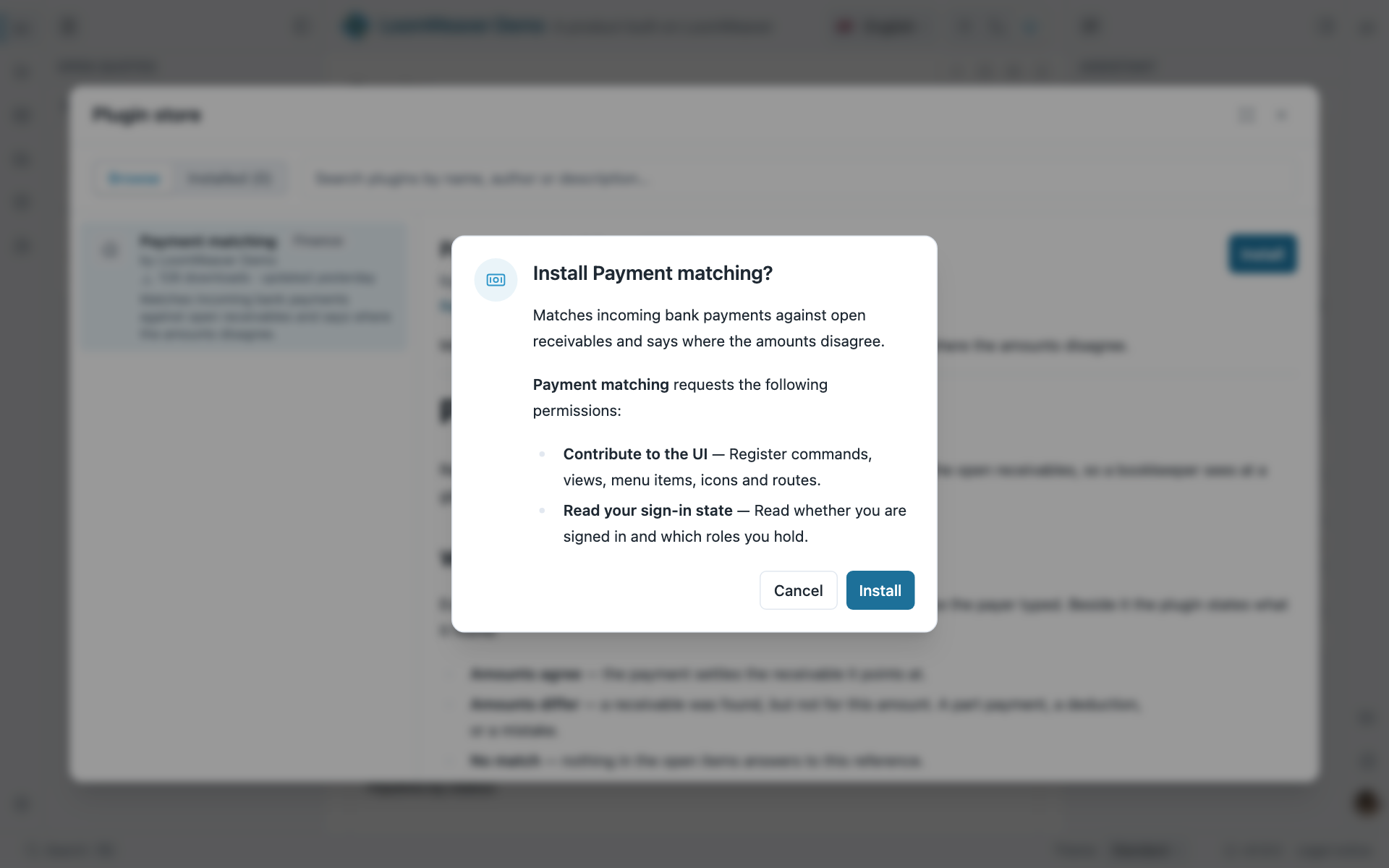
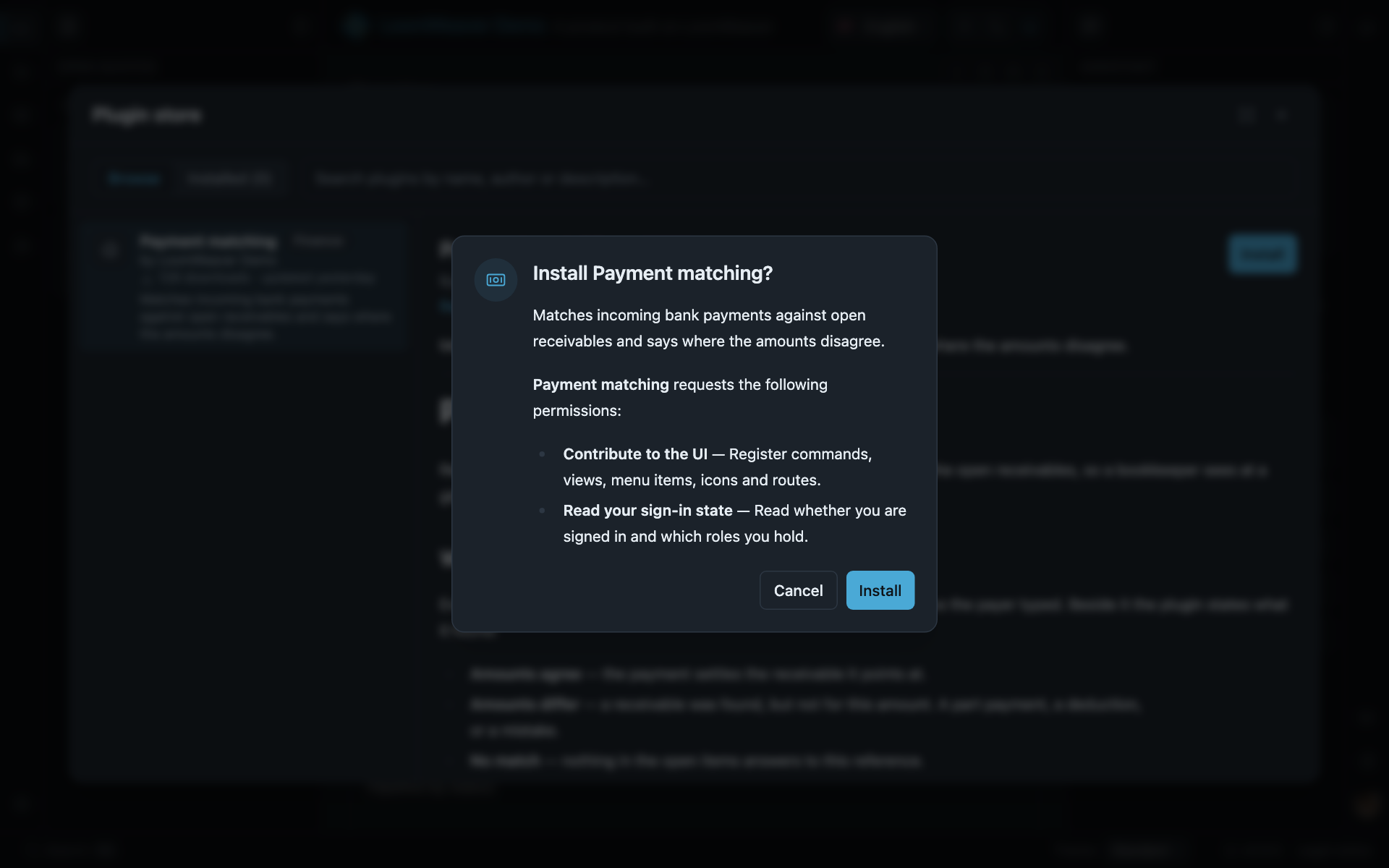
What the user sees before a community plugin runs: the capabilities it declared, and one answer. Accepting grants exactly that list, and nothing the catalogue did not carry.
The install dialog lists the capabilities the plugin declares, and agreeing is the grant: there is no separate grant map for installed plugins. Consequently an update that widens the declaration asks again, listing only what was added; an update that does not, applies silently.
The catalogue’s display fields (author, category, version, iconUrl, readmeUrl) are in
plugin store → the catalogue. Two entry fields that page
does not show are deployed, described above, and level, described under
Frame plugins.
Capabilities
There are seven coarse capabilities. They are exported as CAPABILITIES in canonical order, so a
product building its own permissions UI iterates the list instead of hard-coding it. A plugin
declares what it needs, the distribution grants, and the effective set is the intersection:
the model is default-deny, and Capabilities and trust
says why. What each capability unlocks, and how to grant it, is
Capabilities.
What the user controls
Over the plugins that are theirs, three independent switches, all persisted and all reversible:
- Revoke a capability: the plugin stays loaded, but that
ctxsurface starts refusing. It takes effect at the next call, so contributions already registered stay. Revocation works forward. Only capabilities that were granted can be revoked; a grant is never widened past the distribution.contributionsis not revocable at runtime. It is checked at registration time, so turning it off after activation would change nothing. - Disable a plugin: the whole plugin is unloaded and its contributions disappear; re-enabling spawns it again. Live, without a reload.
- Uninstall: only for community-installed plugins. Its settings are deliberately kept, so a reinstall picks up where the user left off.
For a plugin the operator deployed, none of the three is offered: it was not the user’s decision, and central management only works if what was rolled out is actually running. A disabling stored before that identity was deployed is disregarded rather than honoured, so withholding the switch can never strand someone with something turned off and no way to turn it on. A composed plugin keeps its revoke and disable switches.
The built-in Permissions and Plugin store settings sections expose all three. Your own
front-end can drive the same state through CapabilityGrantService, PluginEnablementService and
PluginInstallService. See the Distribution API.
You can also remove those sections entirely (provideShell({ omit: ['setting:shell.permissions'] }))
if your product decides these are not the user’s call.
Lifecycle
Two runtimes implement the rungs behind the same abstraction: PluginRuntime for composed plugins
and FramePluginRuntime for iframe ones. That is why a plugin’s lifecycle reads the same either
way. Neither is something a distribution wires up: providePlugins and provideFramePlugins do
that. The services in the Distribution API are the
supported way to intervene.
activate(ctx) runs once when the plugin loads; whatever it registers returns a Disposable, and
the runtime disposes all of them on deactivation, so disabling, uninstalling or updating a plugin
leaves no orphaned chrome behind. A plugin that starts something of its own implements
deactivate():
import { Plugin } from '@loomweaver/plugin-sdk';
export const chartsPlugin: Plugin = {  manifest: { id: 'charts', name: 'Charts', capabilities: ['contributions'] },  activate(ctx) {    ctx.registerRailItem({ id: 'charts.rail', rail: 'primary', icon: 'document',      title: 'charts.title', command: 'charts.open' }); // tracked — undone for you on deactivation    startPolling();                                     // your own resource: undo it yourself  },  deactivate() {    stopPolling();  },};
Activation is resilient: a plugin that throws during activate is rolled back and logged, and the
others still come up. One broken plugin cannot take the app with it.
A sandboxed plugin is re-spawned when its signature changes. The signature is the entry URL, the declared capabilities, the granted capabilities and the version. The version matters for updates at the same URL. Without it in the signature, replacing the files would leave the running iframe on the old code while the UI claimed it had updated. The browser re-fetches the entry document on respawn. So serve plugin files with revalidating cache headers, or the “update” hands the user a cached old build.
Contribution ids and collisions
Contributions are addressed by id, and registering an existing id replaces it. That is the mechanism behind distribution-level recomposition (override a default by re-registering it) and it applies to plugins too: a later contribution wins.
Plugin ids themselves are guarded: an installed plugin cannot claim the id of a composed one. Individual contribution ids are not guarded. An installed plugin can therefore replace a menu entry or a content route that something else registered. That is a deliberate consequence of the same-origin, operator-review boundary: what you copy into your catalogue is code you have reviewed. If that trade does not fit your product, do not enable the runtime store.
Next: Backend integration wires your own backend behind the three ports. See also: authoring a weaver for the other side of this contract, and the Distribution API for the services behind the management UI.